Unpack & inspect
Have at least two people available to lower the ramp and move the robot out of the flight case. Keep the packing materials until inspection is complete.
Open the flight case
- Turn the three side latch knobs counterclockwise to release them.
- Open the door. Release the hook-and-loop straps holding the unloading ramp.
- Lower the ramp with one person supporting it to prevent it falling.
- Remove fixing foams 1, 2, and 3 in order. Foam 2 may contain cables or accessories.
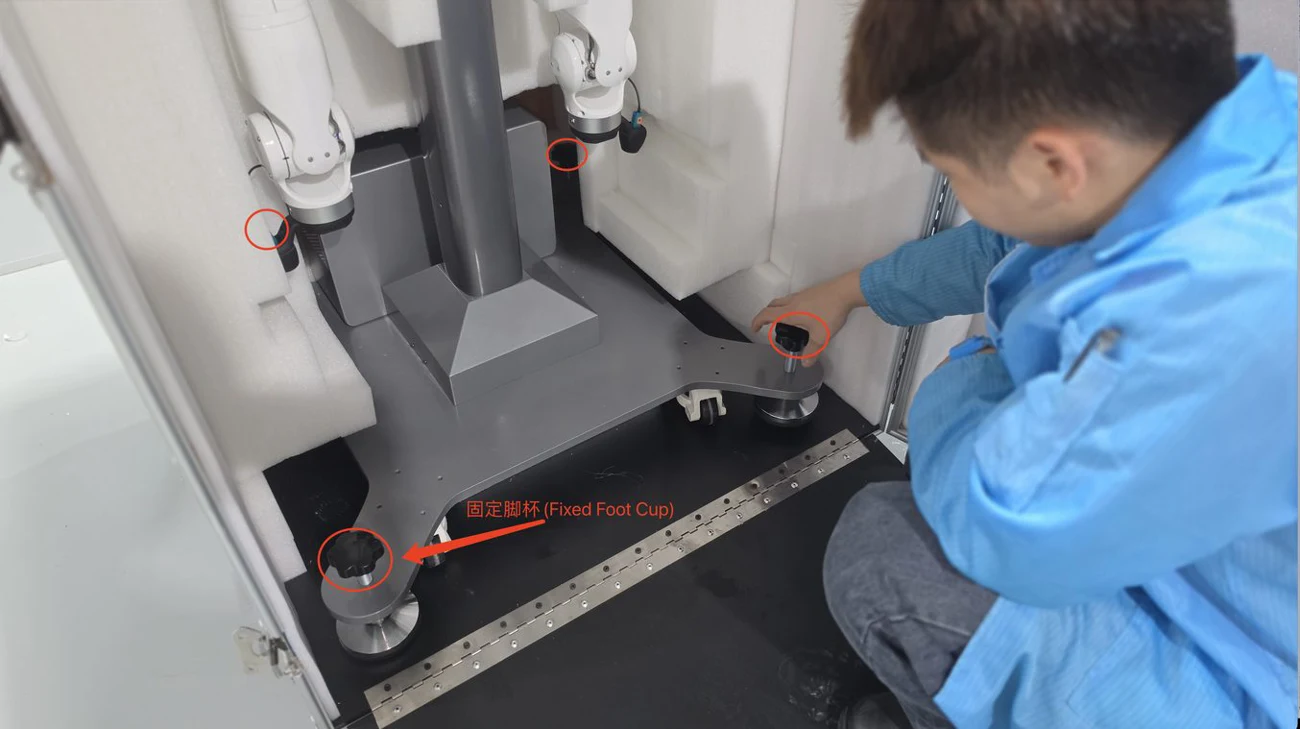
- Turn the four leveling-foot knobs counterclockwise until the feet are clear of the floor.
- With at least two people controlling the robot, carefully roll it out. Prevent it gaining speed on the ramp.
Check the delivered equipment
The manual's standard packing list includes the robot with head cameras, a teleoperation kit, two wrist cameras, two soft grippers, the integrated electrical cabinet, a power cable, and an E-stop. The teleoperation kit includes a USB/Ethernet hub, Ethernet cable, USB drive, VR headset, and headset case.
Check these against your actual order and packing list: supplied end effectors and accessories may vary. Photograph damage or missing parts and contact Gento before proceeding.
Next: connections and power-on.