Marvin Platform & feedback
Marvin Platform is the desktop interface for configuring the robot, monitoring feedback, and using the controller's motion functions. The September Chinese software guide describes Linux x86 and Windows 64-bit support.
Build selection in the source guide
| Controller label in guide | Windows script | Ubuntu script |
|---|---|---|
| “41” | marvinSDK_windows.bat | marvinSDK_ubuntu.sh |
| “43” | marvinSDK_windows_100343.bat | marvinSDK_ubuntu_100343.sh |
The guide names ui_EN.py as the application entry point after the SDK is built. Before using these scripts, check the controller firmware version, identify your arm model and set up its configuration files, and confirm the repository revision. See SDK quick start.
Install and start
To download the SDK, build it on Windows or Ubuntu, and start the app, see Install Marvin Platform.
Parameters and error handling
Each arm's panel has a Parameters section for speed and impedance settings. Speed and acceleration apply only in Position mode; see Speed and acceleration apply only in Position mode. Use the Error Handling section to read and clear errors and to release or hold the brakes. After a collision, follow Move an arm out of a collision.
Feedback fields
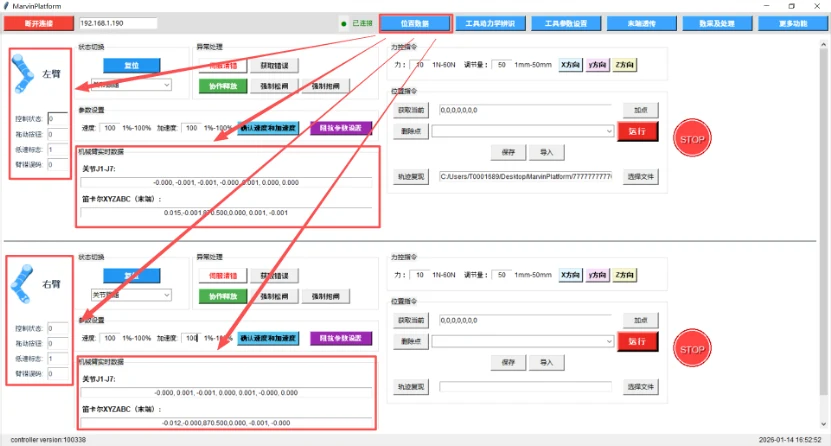
| Field | Meaning in the software guide |
|---|---|
| Position | Joint angle derived from the motor-side encoder |
| Velocity | Joint velocity |
| Torque | Torque-sensor feedback |
| Current | Thousandths of the joint's rated current |
| Temperature | Temperature; the Pro manual notes version-dependent use of this field |
| PositionEX | Joint angle derived from the output-side encoder |
| CmdPosition | Commanded joint position |
| ForceEST | Estimated external joint load |
Torque-sensor feedback and estimated external load are separate values. Current is not presented as amperes in this interface. Confirm units and message definitions in the SDK before recording or controlling from these fields.